Informatica scenario based questions
2/26/2014 02:34:00 pm
Informatica Scenario based interview questions (Convert columns into rows)
This is the one of most frequently asked
informatica scenario based interview question.
We have source data like below in table
A
|
B
|
C
|
Output required is
A
|
B
|
C
|
I have seen rarely a candidate answer this
question correctly. Their answer is mostly a crammed (by reading on various website)
without understanding core concept of informatica transformations.
I will explain three methods to achieve
this then we will find out which one is best method
1. Router Transformation
2. Normalizer Transformation
3. Java Transformation
Router
Transformation : This method take advantage of the
fact that router is an active transformation and one row can fall into multiple
groups i.e. if a row satisfies condition of three groups then it will fall into
three groups and will produce three rows for one input row.
Step1)
Suppose we have a source with three input
columns

Step2)
Create an expression Transformation with field name FLD_OUTPUT to
concatenate three fields separated by # sign

Step3)
Create a router transformation with three output groups with condition
GROUP1 : substr(FLD_OUTPUT,1,instr(FLD_OUTPUT,'#')-1)=FLD1
GROUP2 :
substr(FLD_OUTPUT,instr(FLD_OUTPUT,'#')+1,instr(FLD_OUTPUT,'#',2)-1)=FLD2
GROUP3:
substr(FLD_OUTPUT,instr(FLD_OUTPUT,'#',3)+1)=FLD3

Purpose of this is that row will fall into
three groups ..we are extracting string from concatenated string are comparing
to respective field.i.e value A will be in first group and B in second group
and so on…
Step4) Create union transformation to
combine output from three output group from router..Take FLD1 from first group,
FLD2 from second group ,FLD3 from third group

Output from union will be
A
|
B
|
C
|
Core
Concept: if a row satisfies condition of three groups then it will fall into
three groups and will produce three rows for one input row.
Easy isn’t it …No need to cram. We will now
move to other methods…
Normalizer
: Normalizer
transformation has a property “Occurs :
The number of instances of a column or group of columns in the source row. “
You can define number of occurrence of
source field, Once you define number of occurrence then informatica
automatically creates that number of input ports. In this case 3

Connect FLD1, FLD2 and FLD3 from source or
expression in step2 of first method and FLD as output connected to target.

Output from normalizer will be
A
|
B
|
C
|
Core
Concept : Normalizer transformation has a property “Occurs:
The number of instances of a column or group of columns in the source row. “
Let us move to final and best method
Java
Transformation : We will take advantage of property,
Java transformation is most underutilized transformation of informatica, If
used properly it can do magic
Generate Transaction
|
The transformation
generates transaction rows. You can enable this property for active Java
transformations.
|
Create
a java transformation with one input and one output field

Now
connect concatenated field (A#B#C) from expression
in step2 of first method to FLD_INPUT of java transformation
Now
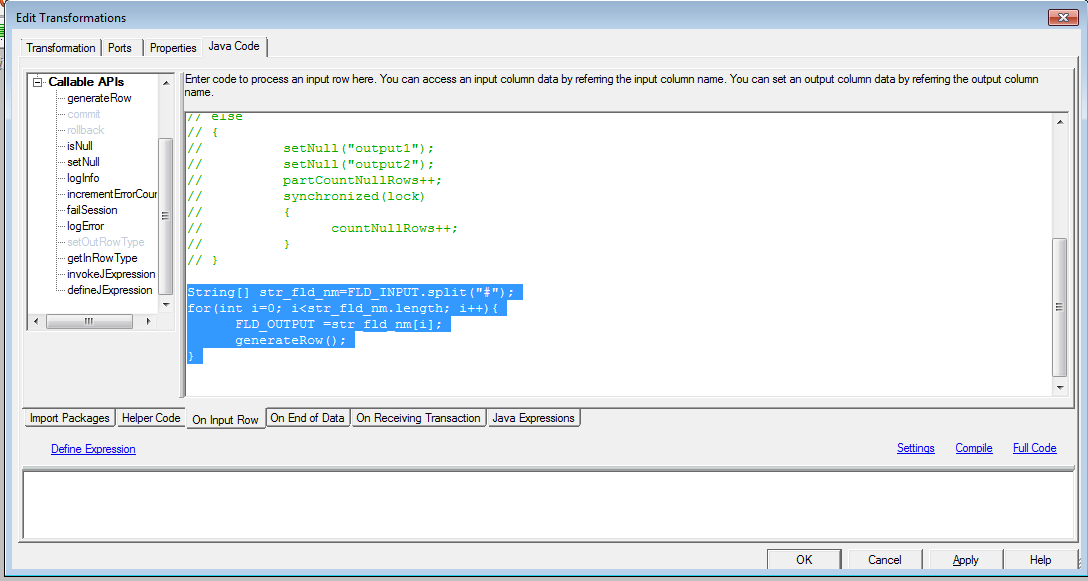
go to java code and copy below
String[] str_fld_nm=FLD_INPUT.split("#");
for(int i=0; i
FLD_OUTPUT
=str_fld_nm[i];
generateRow();
}
It
is using java functionality of array to break input field and multiple fld and
then taking advantage of generateRow() to produce multiple rows.
Now
connect FLD_OUTPUT to target and it will be
A
|
B
|
C
|
Core
concept : Java functionality to break concatenated
string into multiple fields and generateRow() to produce multiple rows.
Now we have covered all three features. Let
us see which one is best
Feature
|
Router
|
Normaliser
|
Java
|
Flexiblity
|
Low (As you have to hardcode number of fields)
|
Low (As you have to hardcode number of occurrence )
|
High (No Hard coding as it can handle any number of
fields)
|
Ease
|
High as developer are comfortable with using router
transformation
|
Medium as developer don’t use it frequently
|
Low. As most developer are not from java background.
It is difficult for them to understand it
|
I request again …don’t cram answers..Instead
understand the concepts..
Please make sure to have a look at our top informatica interview questions at
Top 100 Informatica Interview Questions .These can really make a difference in your interview.
Please make sure to have a look at our top informatica interview questions at
Top 100 Informatica Interview Questions .These can really make a difference in your interview.